
Show your customers the allergens in every dish, free
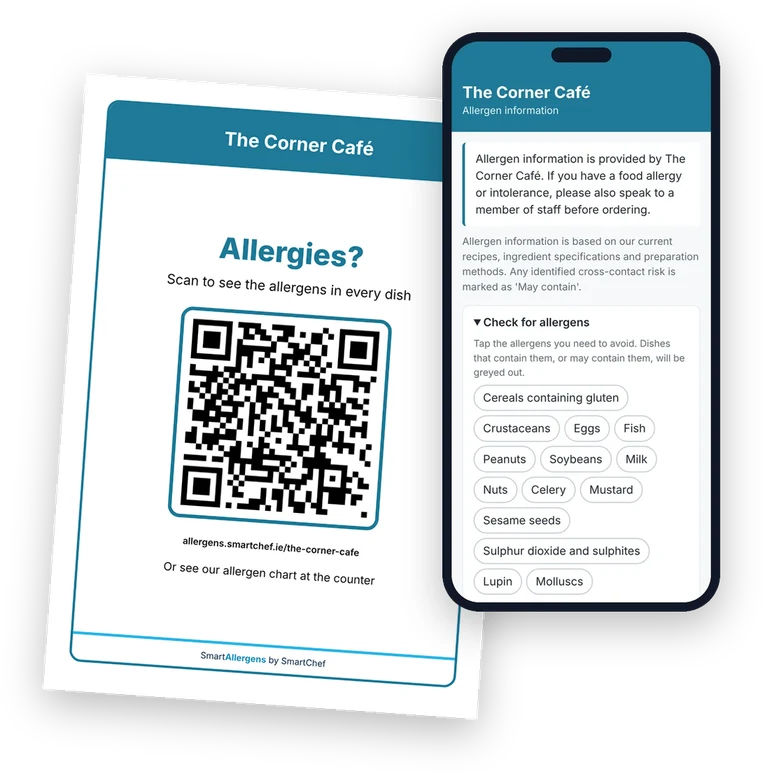
A printed allergen QR sign for a café next to a phone showing the café's allergen information

The sign you print for your tables, and what customers see when they scan it.

Type in your dishes and tick which of the 14 allergens are in each one. You get a printed allergen chart to display and a QR code sign for your tables, so customers can check on their phone which dishes they need to avoid.

SmartAllergens is a free website for cafés, pubs, restaurants, food trucks and hotels. There's nothing to install, no card needed and nothing to pay.

A printed allergen QR sign for a café next to a phone showing the café's allergen information

The sign you print for your tables, and what customers see when they scan it.

See it working in about a minute

Follow one pesto from your kitchen to your customer's phone, and see what you do when your supplier changes it.

Create your free menu

or try it first, no sign-up

Read the transcript

Are there nuts in the pesto? It's a fair question. Do your staff know the answer? With SmartAllergens, you answer it once. Add the dish, tick the allergens it contains, and say which cereal or nut. This pesto is made with cashews. Everything else is set to No in one tap. Press Publish, and it's on your allergen chart and on a page your customers open by scanning your QR code. Your customer taps what they avoid, and any dish that contains or may contain it is greyed out, with the reason shown. Then your supplier sends a different pesto, and this one has egg in it. Change one tick and publish again. Print the new chart, and the sign on the table stays exactly as it is. SmartAllergens. It's free, and it stays free. Create your menu at allergens.smartchef.ie.

What you get

A printed allergen chart

Every dish and its allergens on one sheet, to put on display.

A page for your customers

They scan your QR code sign and check your allergens on their phone.

A QR code for your own menus

The same code, to add to your printed menus or table cards.

Why it matters

Under Irish law, food businesses supplying non-prepacked food or drink must provide written information identifying any of the 14 regulated allergens present in each item. The information must be clear, easy to find and available before ordering. In a lot of places that information lives in a folder, a spreadsheet or someone's head, so the answer a customer gets depends on who's on shift.

SmartAllergens gives you one place to keep it, and it puts the same answer in front of your customers and your staff every time.

The 14 allergens are cereals containing gluten (wheat, rye, barley and oats), crustaceans (prawns, crab, lobster), eggs, fish, peanuts, soybeans, milk, nuts (such as almonds, hazelnuts and walnuts), celery, mustard, sesame seeds, sulphur dioxide and sulphites, lupin and molluscs (mussels, oysters, squid).

How it works

You can have your first menu up in an afternoon or less.

1. Type in your dishes

Add your menus, such as breakfast, lunch, specials and drinks, and the dishes on each one. You can do it on a phone, tablet or computer.

2. Tick the allergens

For each dish, tick the allergens it contains or may contain. For cereals and nuts you also pick which ones, like wheat or almonds. One button marks all the others as No, so you're not ticking fourteen boxes every time.

3. Publish and print your sign

When a menu is ready, you publish it. That creates your own allergen page, at an address like allergens.smartchef.ie/the-corner-cafe. Then you print a sign with your QR code.

4. Customers scan it

They point their phone camera at the sign and your allergens open. They don't need an app and they don't need to sign up.

What your customers see
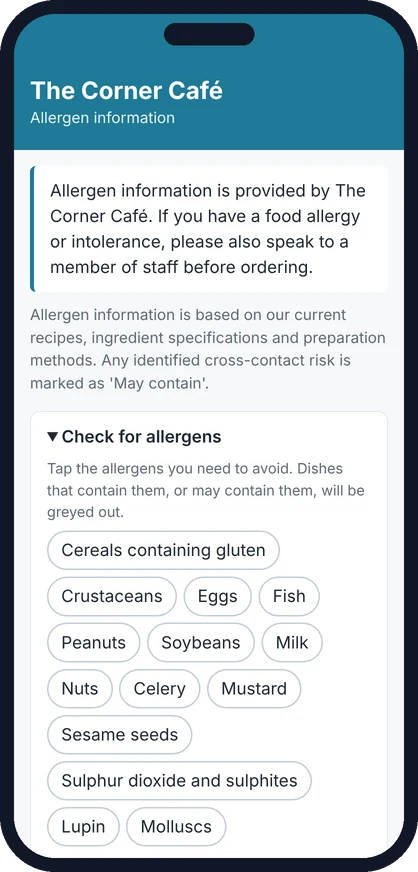
A café's allergen page on a phone, with a button for each of the 14 allergens

What opens when a customer scans the sign.

Your allergens, on their phone

Your allergen page opens straight away on their phone, with your own notes at the top.
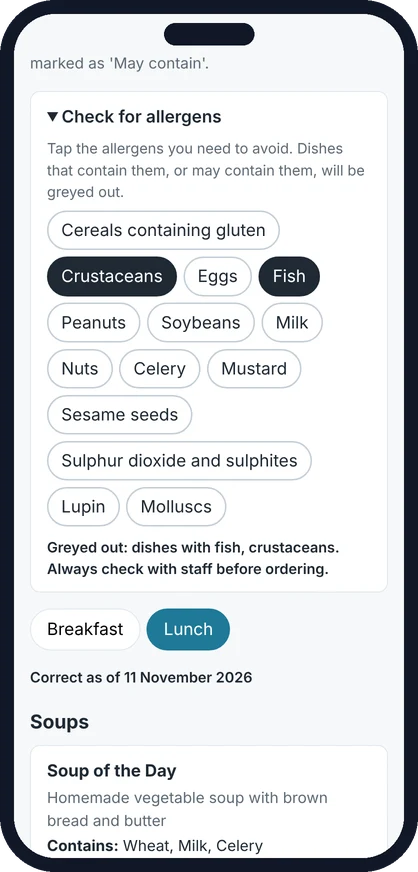
The allergen buttons on a phone with Fish and Crustaceans chosen

A customer who avoids fish and shellfish has tapped Fish and Crustaceans.

They tap what they need to avoid

Your customer taps the allergens they need to avoid. Here that's fish and crustaceans.
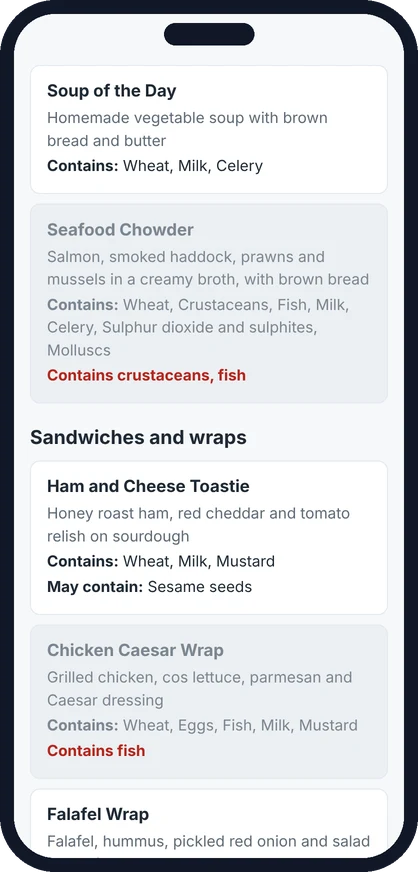
A café's lunch menu on a phone with the seafood chowder greyed out and marked Contains crustaceans, fish

The chowder is greyed out, with the reason underneath.

Dishes with those allergens are greyed out

Any dish that contains them, or might contain them, is greyed out and the reason is shown underneath. Nothing is hidden, so they can still see your whole menu.

Try a sample café's allergen menu

It opens the real thing, as it looks on a phone. Tap the allergens to see dishes grey out.

Your QR sign, allergen chart and QR code

Print them on your own printer, or save them as a PDF. Click any of them to see it full size.

Under the Irish rules, a QR code on its own isn't enough, because not every customer has a phone to hand. The printed chart covers that, and the QR code is a handy extra.
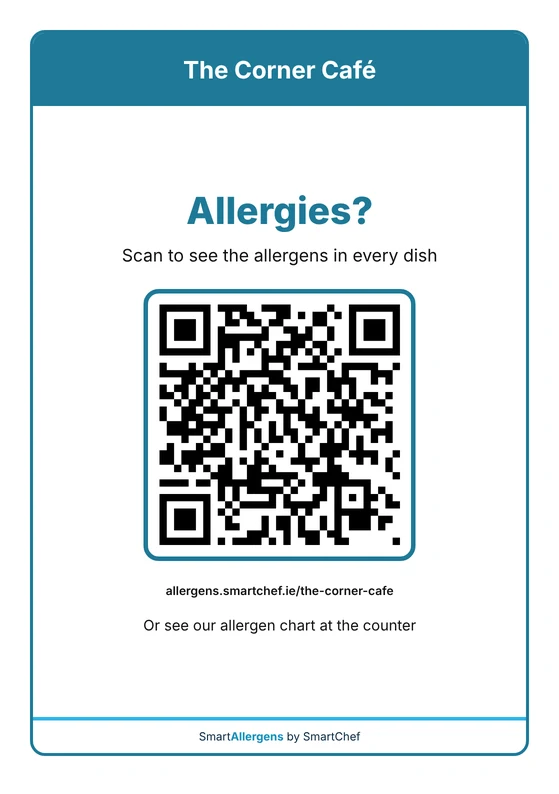
A sample A5 allergen QR sign for a café, reading Allergies? Scan to see the allergens in every dish

A sample sign. Customers scan the square code with their phone camera.

The QR code sign

A sign for your tables, counter or window, with your name, your colour and your QR code. It can point customers to your chart at the counter too. You can print it in A4, A5 or US Letter.
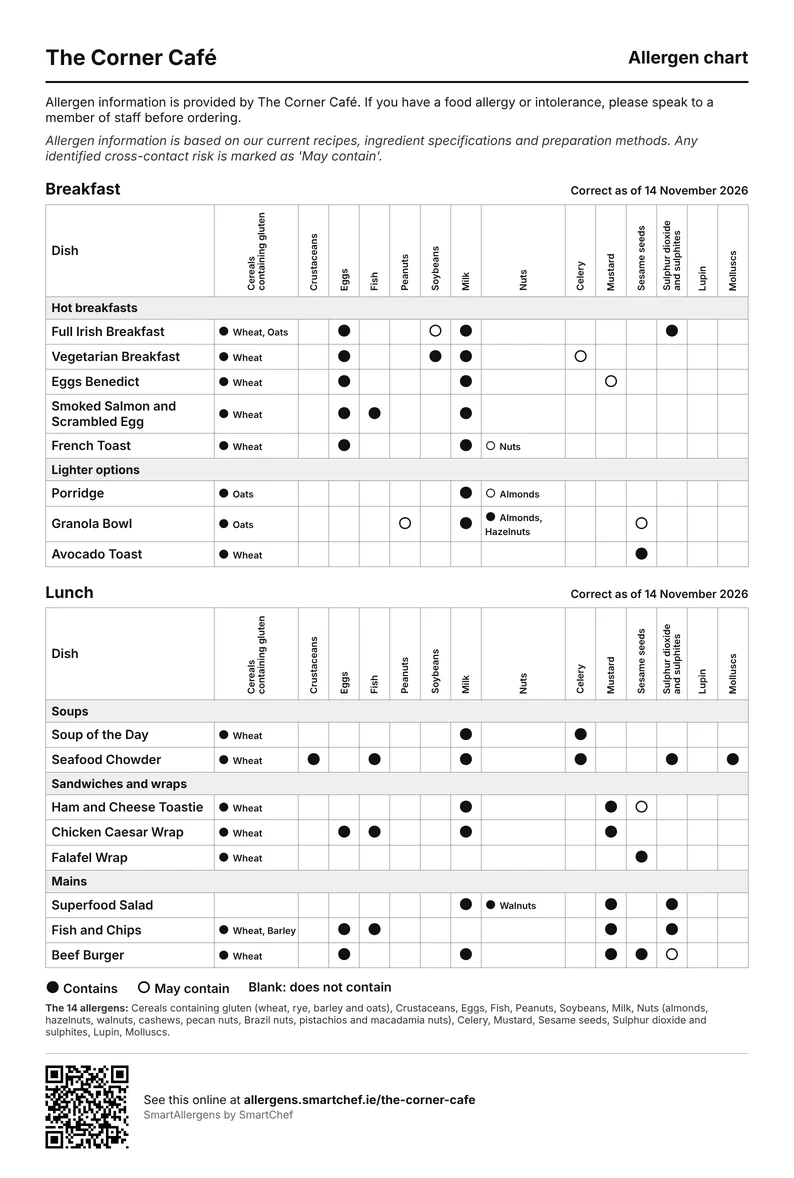
A sample allergen chart for a café's breakfast and lunch menus, with dishes down the side and the 14 allergens across the top

A sample chart. A filled dot means the dish contains the allergen, and an open dot means it may contain it. Cereals and nuts are named.

The allergen chart

One sheet with your dishes down the side and the 14 allergens across the top. A dot shows where an allergen is in a dish or may be, with the cereal or nut named beside it, like wheat or almonds. It's made to go on display where customers can check it before they order, without having to ask. It prints well in black and white.
A sample QR code for a café's allergen page, on its own

A sample QR code on its own.

Your QR code, for your own menus

The same QR code on its own, to add to your own printed menus, table cards or posters. Download it as a picture, or as a file for your designer or printer. It always opens your allergen page, so it keeps working when your dishes change.

When your menu changes

Update and publish again

If a recipe changes, you update the dish and publish again. Your QR code stays the same, so your QR sign doesn't need reprinting. You must reprint and update your allergen chart whenever the published allergen information changes.

Nothing changes until you publish

You can edit as much as you like. Customers only see your changes when you publish them, and any allergens you haven't answered are pointed out first.

A record of what your menu said

We keep a copy of every version you publish, with the date and who published it, so there's a record of what your menu said on any given day.

It's free, and it stays free

You don't need SmartChef or any other plan to use SmartAllergens. Any food business can sign up and use all of it for free, with no card, no trial period and no limit on menus or dishes.

If you already use SmartChef, you have it already. Admins and managers will find Allergens in the SmartChef menu.

Frequently asked questions

Yes. It's free for any food business, with no card, no trial period and no limit on menus or dishes. You don't need to be a SmartChef customer to use it, and it will stay free.

No. You don't need SmartChef or any paid plan. Sign up for SmartAllergens on its own and it's free, for good. SmartChef is our separate app for daily food safety records, and you only need it if you want those records too.

Yes. The practice copy is filled in with a sample café, and you can try everything: add dishes, tick allergens, publish and print. Nothing you type is saved on our system or shown to anyone else, and it's cleared when you close the tab. You can also see the sample café's allergen menu the way your customers would.

They're cereals containing gluten (wheat, rye, barley and oats), crustaceans (like prawns, crab and lobster), eggs, fish, peanuts, soybeans, milk, nuts (almonds, hazelnuts, walnuts, cashews, pecan nuts, Brazil nuts, pistachios and macadamia nuts), celery, mustard, sesame seeds, sulphur dioxide and sulphites, lupin and molluscs (like mussels, oysters and squid). This is the EU and Irish list, and it's the one SmartAllergens uses. For every dish, you mark each one as No, Contains or May contain.

Because the rules say the cereal or the nut itself has to be named. A dish with bread in it is declared as containing wheat, and a dish with pesto might be declared as containing cashews. When you tick cereals containing gluten or nuts on a dish, SmartAllergens asks you which ones, and it won't let that menu be published until you've said.

In Ireland, food businesses supplying non-prepacked food or drink must provide written information identifying any of the 14 regulated allergens present in each item. The information must be clear, easy to find and available before ordering. SmartAllergens helps you record and display this information through a customer page and a printable allergen chart. You remain responsible for ensuring the information you enter is accurate, complete and updated whenever a recipe, ingredient, preparation method or supplier changes. For the rules themselves, see the FSAI's guidance on allergen information for non-prepacked food. SmartAllergens is not endorsed by or affiliated with the Food Safety Authority of Ireland.

Allergen information for food that isn't prepacked has to be given to customers in writing, where they can find it before they order without having to ask. A chart on display, sometimes called an allergen matrix, is one handy way of doing that, and a QR code on its own isn't enough. SmartAllergens makes the chart for you from your published menus, and it prints well in black and white.

No. They point their phone camera at your QR code and your allergen page opens in their browser. There's nothing to download and nothing to sign up for.

Whenever a recipe, an ingredient or a supplier changes. You change the dish and publish the menu again, and customers see the new version straight away. Each menu shows a "Correct as of" date, so customers can see how recent it is.

Yes. You can add your own note and it shows at the top of your allergen page and on your printed chart. There's suggested wording you can use or change. It's best to mark a specific risk, like a shared fryer, as May contain on the dish itself, and not to cover every dish with one blanket statement.

Add them like any other dish. Lots of places keep a separate Specials or Drinks menu and publish it again whenever it changes. Drinks count too, so remember things like sulphites in wine and gluten in beer.

Contains means the allergen is in the dish, including anything in its sauces, dressings or garnishes. May contain should only be used where you've identified a risk of accidental cross-contact, for example from a shared fryer, or from an ingredient your supplier labels as may contain. If an allergen is in the dish, always mark it as Contains.

Before you publish, SmartAllergens shows you any allergens you haven't answered and asks you to confirm. If you go ahead, those blanks are saved as No, so it's worth checking them first.

Yes. You can switch any dish off the menu and back on again later, so you don't have to type it in again. You can also take a whole menu offline at any time, for example a seasonal menu that's finished.

Yes. You can download the QR code on its own, as a picture for everyday use or as a file for your designer or printer. It always opens your allergen page, so the QR code itself never needs reprinting when your dishes change. Your allergen chart does: reprint it whenever the published allergen information changes.

Yes. If you change it, the old address keeps forwarding to the new one, so any QR codes you've already printed keep working. You can also add your logo, colour, address and phone number whenever you like.

A free account has one login, for the person who signed up. If you use SmartChef, your Admins and Managers can open SmartAllergens from SmartChef with one click.

No. SmartAllergens is included with every SmartChef plan. Admins and managers will find Allergens in the SmartChef menu, and it signs them straight in.

SmartAllergens is currently available in English only, as this meets Irish legal requirements.

It's stored on Google Cloud in the EU. Your published allergen page is public, because that's what your customers open, but your unpublished menus and account details are private to you.

We use it for your account, for things like signing in and resetting your password. We only send you news about SmartChef if you tick the box when you sign up, and every email we send has a link to unsubscribe. Our privacy policy has the details.

Get your allergens sorted, free

Sign up with your email or Google account and add your first dishes today.

Already use SmartChef? It's in your account, under Allergens in the menu. Already signed up? Log in to SmartAllergens.

SmartAllergens is not endorsed by or affiliated with the Food Safety Authority of Ireland. Each food business remains responsible for the accuracy of the allergen information it provides.

Related pages

Free HACCP Templates

Printable record sheets for temperatures, deliveries, cleaning and more.

Learn More

Safe Catering Pack Explained

A plain-English guide to the records an Irish food business keeps.

Learn More

Digital HACCP Software

An app for your daily food safety records, from €25 a month plus VAT.

Learn More