
Delivery Records for Outbound Food — How to Track Deliveries to Customers with Full Traceability
Published on: April 5, 2026
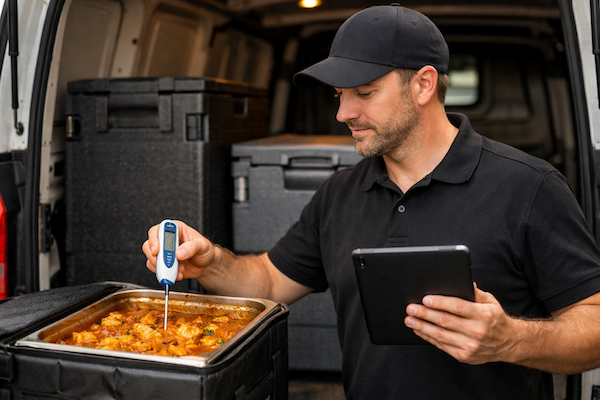
If your business delivers food to customers — whether you're a catering company serving events, a care home kitchen sending meals to residents, a school meals provider, or a restaurant with a delivery service — you need a way to prove that food arrived safely at the right temperature. That's exactly what a transport and delivery record is for.
If your kitchen uses the FSAI's Safe Catering Pack, these are the same delivery details you're already recording on paper. SmartChef is not affiliated with, endorsed, or approved by the FSAI.
While most kitchens are familiar with incoming delivery records and cooking records, outbound delivery documentation often flies under the radar — until an Environmental Health Officer asks to see it.
In this guide, we'll explain what a delivery record is, who needs it, what information you must record, and how SmartChef makes it effortless to stay compliant. We'll also show you how SmartChef intelligently links delivery records to cooking records through batch codes — creating full end-to-end traceability that paper forms simply can't achieve.
Key Takeaways
- Delivery records are required for any business delivering food to customers (caterers, care homes, schools, restaurants)
- Temperature compliance: Chilled 0-5°C, Frozen ≤-18°C, Hot ≥63°C
- SmartChef links delivery records to cooking records via batch codes for full traceability — something paper forms can't do
- Digital records are accepted by Environmental Health Officers
1. What is a delivery record and why does it matter?
A transport and delivery record documents the monitoring of food deliveries to customers. Its purpose is simple: to record that food arrived safely.
When you transport food from your kitchen to another location, the cold chain (or hot chain) can break. Temperatures can drift. Cross-contamination can occur between raw and ready-to-eat foods. A delivery record gives you documented proof that you checked these critical control points before handing food over to your customer.
Without delivery records, you have no evidence that delivered food was safe at the point of handover. If a customer becomes ill, or if there's a recall situation, you'll have no records to fall back on. With delivery records properly completed, you can demonstrate due diligence and protect your business.
2. Who needs delivery records?
Delivery records are essential for any food business that delivers prepared food to customers. This includes:
- Catering companies — delivering buffets, corporate lunches, wedding meals, and event catering
- Care homes — receiving meals from central production kitchens or cook-chill facilities
- Schools and creches — with centralised meal preparation delivered to multiple sites
- Hospitals — transporting patient meals between buildings or from external suppliers
- Restaurants with delivery services — whether using your own drivers or third-party couriers
- Cloud kitchens and dark kitchens — where all food leaves the premises for delivery
- Meal prep companies — delivering pre-prepared meals to customers' homes
If food leaves your kitchen and travels to a customer, delivery records apply to you.
3. What should a delivery record capture?
A delivery record captures the following information for each delivery:
Date
The date the delivery was made. This establishes when the food left your control.
Food Item
A description of what was delivered — for example, "Chicken curry", "Vegetable lasagne", or "Sandwiches (mixed)".
Batch Code / Use-by Date
This is where traceability comes in. By recording the batch code, you create a link back to when the food was prepared. If you use SmartChef, batch codes are automatically generated when you complete cooking records, making it simple to select the correct batch when completing delivery records.
Customer Details
Who received the delivery — the customer name, business name, or delivery location.
Adequate Separation of Raw and Ready-to-Eat Foods (Yes/No)
A critical safety check. Raw meat, poultry, and fish must never come into contact with ready-to-eat foods during transport. This field confirms the check was made.
Delivery Temperature
The temperature of the food following transport, measured in degrees Celsius. Under Irish food safety requirements, the required temperatures are:
| Food Type | Required Temperature |
|---|---|
| Chilled food | 0°C to 5°C |
| Frozen food | -18°C or below |
| Hot food | 63°C or above |
Comments/Action
Space to record any issues or corrective actions — for example, "Temperature slightly high at 7°C, food placed in fridge immediately" or "Packaging damaged, item rejected".
Signature
The person completing the delivery check signs to confirm the information is accurate.
4. How SmartChef links delivery records to cooking records through batch codes
This is where SmartChef goes beyond paper-based compliance. Paper forms don't actually connect to each other. SmartChef changes that — intelligently linking your cooking records to your delivery records through automatic batch codes.
Here's how SmartChef creates the traceability chain:
- You cook food and complete a cooking record in SmartChef — you can use SmartChef's automatic batch codes (e.g., 260405-001 for the first batch on 5th April 2026) or enter your own manual batch codes if you have an existing system. Either way, the batch code is recorded alongside the food item, cooking temperature, and cooling times
- You deliver the food and complete a delivery record in SmartChef — staff select from a dropdown of recent batch codes, or enter a manual batch/lot code for pre-packaged goods, instantly linking the delivery to its origin
- Full traceability is established — if there's ever a food safety concern, you can trace from the delivery back to the exact cooking batch, including who prepared it, when, and at what temperatures
This "one step forward, one step back" traceability is exactly what Environmental Health Officers expect. With paper forms, maintaining this link requires careful manual record-keeping. With SmartChef, it happens automatically.
5. Common mistakes with delivery records — and how SmartChef prevents them
Based on feedback from Irish kitchens and EHO inspection findings, here are the most common delivery record mistakes — and how SmartChef helps you avoid them:
- Not using delivery records at all — many businesses don't realise they need delivery records for outbound food. SmartChef makes delivery records part of your standard workflow, so it doesn't get forgotten.
- Missing batch codes — without batch codes, you lose traceability. SmartChef can auto-generate batch codes in cooking records, or you can enter your own. Either way, they appear in a dropdown when completing delivery records.
- Incomplete temperature records — recording "OK" instead of actual temperature readings. SmartChef requires actual temperatures and validates them against safe ranges.
- No corrective actions documented — when temperatures are out of range, the action taken must be recorded. SmartChef flags out-of-range temperatures immediately and prompts for corrective action.
- Paper records getting lost — delivery drivers leave clipboards in vans, records go missing. SmartChef stores everything securely in the cloud — records can't be lost.
- No management review — delivery records should be reviewed regularly. SmartChef gives managers a central dashboard to review all delivery records across sites.
6. Why SmartChef is the smart way to handle delivery records
SmartChef captures exactly what's required for compliance. But SmartChef adds intelligence that paper forms simply can't provide.
Environmental Health Officers are generally happy with digital HACCP systems, provided you can export records clearly and show timestamps and user trails. SmartChef delivers all of this, plus features that make compliance genuinely easier:
- Flexible batch code options — SmartChef can auto-generate batch codes in the format YYMMDD-NNN (e.g., 260405-001), or you can enter your own manual codes if you have an existing system. Your choice
- Intelligent batch code linking — when completing delivery records, staff select from a dropdown of recent batch codes from cooking records, or enter manual lot codes for pre-packaged goods. Either way, you get instant traceability that paper records could never achieve
- Real-time temperature validation — if a temperature is entered outside the safe range, SmartChef flags it immediately and logs the alert. No more discovering problems after the fact
- Digital signatures — staff sign on screen, creating a clear audit trail with timestamps
- Multiple delivery items per record — one delivery record can include multiple food items going to the same customer
- Records that can't be lost — everything is stored securely in the cloud, accessible from any device. No more missing clipboards or damaged paperwork
- Instant export for EHO inspections — when an inspector asks for records, you can export them in seconds
7. Real-world scenarios where SmartChef's delivery records make a difference
Catering company delivering to a wedding
You prepare 150 portions of chicken supreme, transport them in hot boxes, and deliver to the venue. Your driver completes a delivery record in SmartChef on their phone — selecting the batch code from this morning's cooking record, confirming the temperature was 65°C on arrival, and signing digitally. If a guest later reports illness, you have timestamped, linked records showing exactly when the food was cooked, by whom, and that it arrived at the correct temperature.
Central kitchen serving multiple care homes
Your production kitchen prepares meals for four care homes. Each delivery driver completes a delivery record in SmartChef for every drop-off, selecting batch codes and recording temperatures. Back at the office, management can review all delivery records on the SmartChef dashboard and spot patterns — perhaps one van consistently has temperature issues, indicating an equipment problem that needs attention.
School meals provider
You deliver hot lunches to 12 schools each day. With SmartChef, every delivery is documented with batch codes linking back to cooking records, temperatures are verified and validated, and if a parent or inspector ever raises concerns, you can export a complete audit trail showing exactly what was delivered, when, at what temperature, and who signed off.
8. Getting started with delivery records in SmartChef
If you're not currently tracking outbound deliveries, SmartChef makes it simple to get started with complete delivery records:
- Enable delivery records in your SmartChef account — we'll switch on the delivery records feature for you
- Set up your delivery customers — add the customers you regularly deliver to for quick selection
- Start using batch codes in cooking records — use SmartChef's automatic batch codes or enter your own manual codes when you complete cooking records
- Complete a delivery record for each delivery — staff select the batch code from the cooking record, record the temperature, confirm separation, and sign
- Review records from your dashboard — management can check all delivery records centrally and spot any patterns
Because SmartChef intelligently links delivery records to cooking records, you get the traceability that paper forms can't deliver.
Contact us for more information about how SmartChef can help you track food deliveries with full traceability.
FAQ: Delivery Records and Food Traceability
1. What is a transport and delivery record?
A transport and delivery record is used to document monitoring of food deliveries to customers, including temperature checks, batch codes, and confirmation that raw and ready-to-eat foods were kept separate during transport.
2. Who needs to use delivery records?
Delivery records are essential for any food business that delivers food to customers. This includes catering companies, care homes receiving meals from central kitchens, schools with meal delivery services, restaurants offering delivery, and any business transporting cooked or prepared food to another location.
3. What information must be recorded on a delivery record?
A delivery record requires: date of delivery, food item description, batch code or use-by date, customer details, confirmation of adequate separation of raw and ready-to-eat foods (Yes/No), delivery temperature following transport, comments or corrective actions, and signature of the person completing the record.
4. What temperatures should food be at during delivery?
Under Irish food safety requirements, chilled food should be between 0°C and 5°C, frozen food should be at or below -18°C, and hot food should be at or above 63°C when delivered.
5. How do batch codes help with food traceability?
SmartChef can auto-generate batch codes when you complete cooking records, or you can enter your own manual codes if you have an existing system. When completing a delivery record, staff select from a dropdown of recent batch codes, creating a traceable link between when food was cooked and when it was delivered. If there is ever a food safety concern or recall, you can trace exactly which batch was affected, when it was made, and which customers received it.
6. Can delivery records be kept digitally?
Yes. Records can be kept electronically as long as the same information is captured accurately and securely. Environmental Health Officers accept digital HACCP systems provided you can export records clearly and show timestamps and user trails.
7. What happens if delivery temperature is out of range?
If the temperature is outside the safe range, you must record corrective action in the Comments/Action field. This might include rejecting the delivery, reheating hot food to safe temperatures, or disposing of food that has been in the temperature danger zone too long.
8. How does SmartChef handle delivery records?
SmartChef digitises delivery records with automatic batch code generation, temperature validation with alerts, digital signatures, and direct linking to cooking records. Staff can complete delivery records on phones or tablets, and all data is stored securely with full audit trails.
9. Do I need delivery records if I only do takeaway collections?
Delivery records are specifically for deliveries where you transport food to customers. If customers collect food from your premises, delivery records are not required. However, you still need other HACCP records like cooking records and hot holding records to ensure food is safe at point of collection.
10. How often should delivery records be reviewed by management?
The delivery record includes a Manager/Supervisor check section. Best practice is to review delivery records regularly — ideally daily or weekly depending on your delivery volume — to catch any recurring issues with temperatures, suppliers, or procedures.
Related Articles
The Fastest HACCP Delivery Check — Snap, Sign and Done
See how SmartChef's AI-powered delivery checks let your team log incoming deliveries in about 10 seconds.
Cooking, Cooling & Reheating Records
Learn how cooking records work with batch codes that link to delivery records.